










Skip to content
Lexoh kiosk used for visitor identification and assistance
Temporary arrivals

Visitor management for parking and controlled sites

Parking visitor management creates a temporary access right for a named visit, approved destination and end time. Lexoh connects the configured plate, QR code or assisted-arrival process to entrance equipment, while hosts and reception staff manage changes and exceptions.

Operating design

Keep temporary access temporary

Define the visit before choosing the credential: who is expected, which entrance and zone they may use, when access starts and ends, and who can approve a change. A changed plate or late arrival should lead to a clear correction or lane assistance process. Recurring employees or residents belong in permit management when their access is ongoing rather than attached to a particular visit.

01

Advance invitation

Set access permissions before arrival using only the information the site needs.

02

Temporary identifier

Attach a plate or code to a defined period and set of zones.

03

Assisted arrival

Give authorized staff enough context to handle an unplanned case.

04

Automatic expiry

Remove rights that no longer have an operating purpose.

05

Passage history

Review the access result when staff need to answer a question.

06

Visit types

Keep guests, suppliers, contractors and event attendees distinct.

Decision path

From invitation to access expiry

An invitation identifies the responsible host and visit period. At arrival, the system checks the current access permission; its configured end time limits access. If departure should also close the visit, confirm that behavior in the project. Define how cancellations and changes reach the people handling the entrance.
  1. 01
    InviteHost and purpose recorded
  2. 02
    IdentifyTemporary plate or code
  3. 03
    ArriveRight checked at the lane
  4. 04
    AssistContext available if needed
  5. 05
    ExpireAccess removed on time
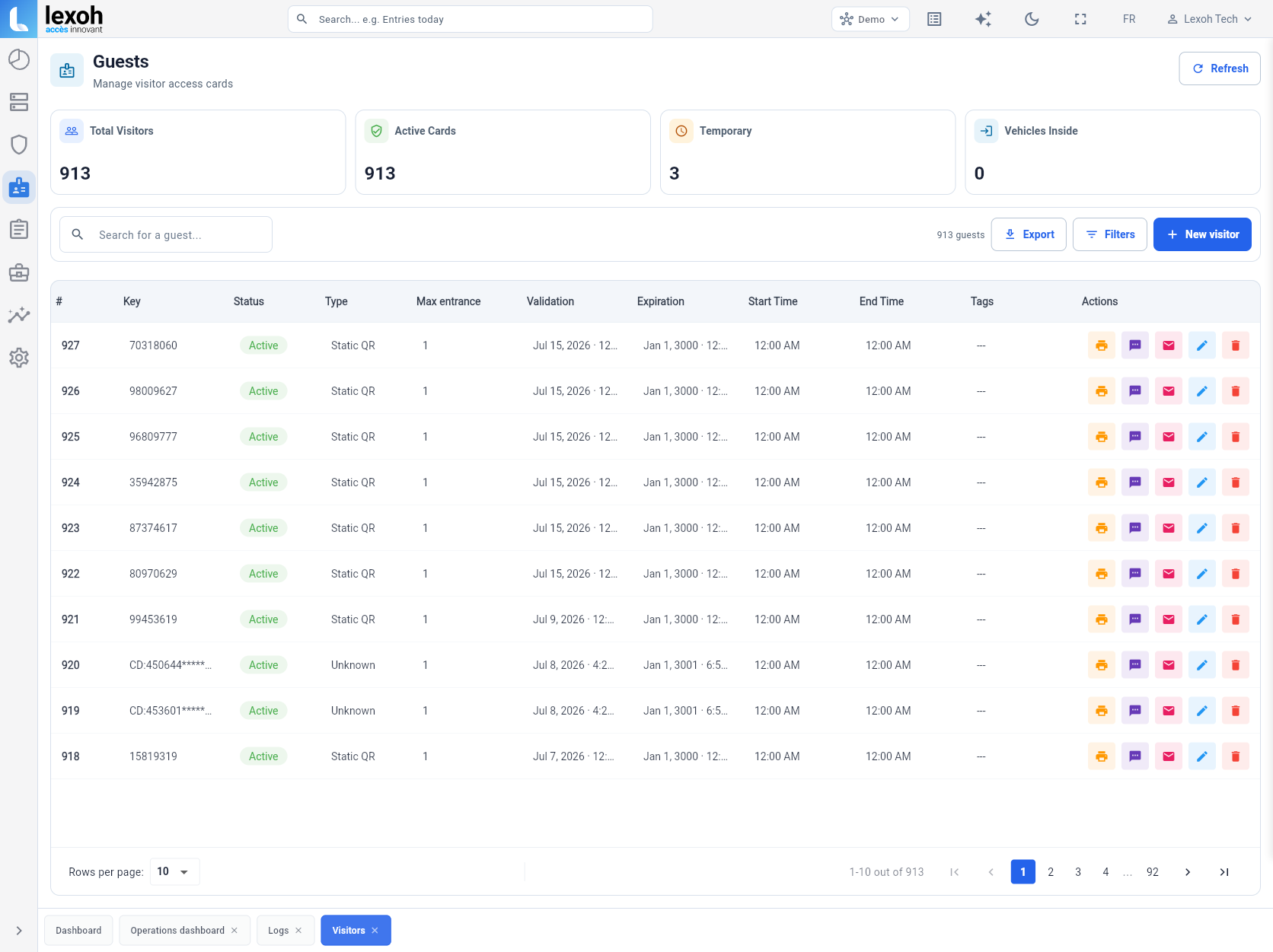
Lexoh Security Center visitor and credential management view
The Guests view in Lexoh Security Center shows credential status and type, maximum entries, validation and expiry dates, and start and end times. This capture uses the Demo account. Enlarge the interface ↗
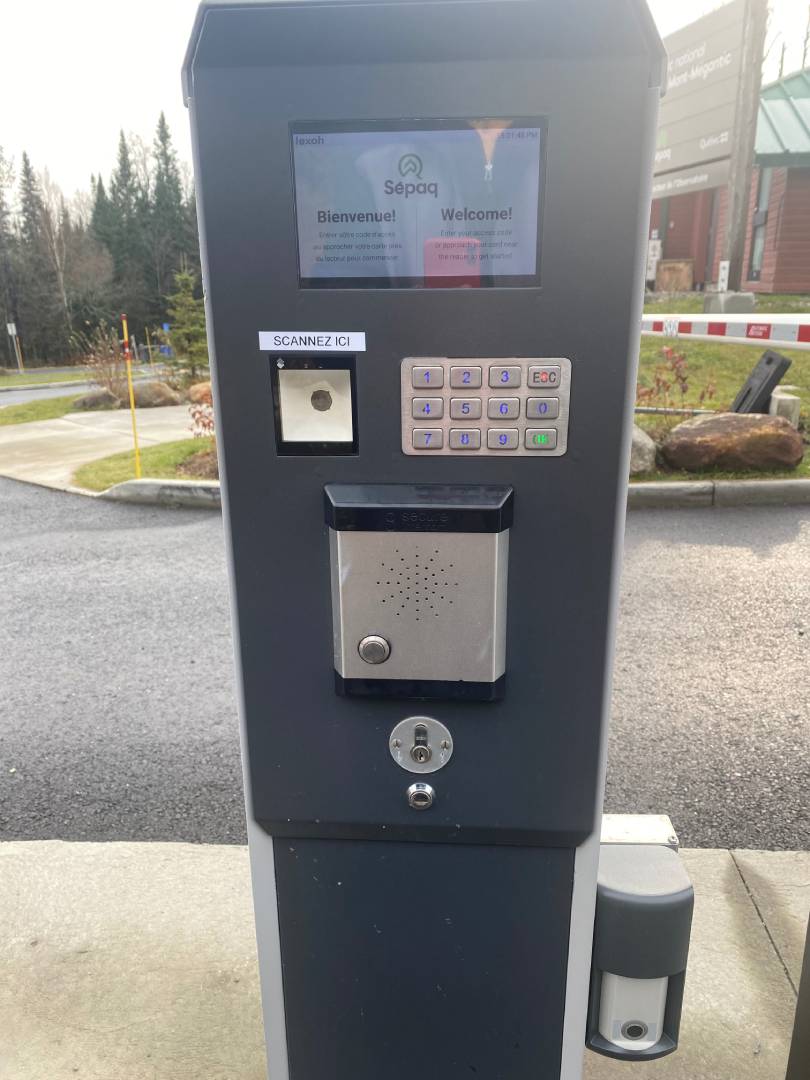
Lexoh kiosk used for visitor identification and assistance
Outdoor service point deployed at Sépaq Mont-Mégantic.
On site with Lexoh

Self-service arrival with a path to help

A kiosk can combine identification, instructions and assistance. That matters when a visitor does not know the site or reception is far from the entrance.

View the Sépaq Mont-Mégantic entrance →

Plan visitor arrivals and assistance for your site →

What this changes in the project Equipment placement, civil work, communications and operating procedures are validated together before commissioning.
Turnkey delivery

Build the arrival process with reception and security

Lexoh connects visitor permissions, entrance equipment and assistance procedures so hosts, reception and security can manage the same arrival process.
  1. 01Map visit types and owners
  2. 02Define the minimum data required
  3. 03Choose plate, QR, intercom or a combination
  4. 04Configure zones and validity periods
  5. 05Connect the process to lanes and assistance
  6. 06Test planned and unexpected arrivals
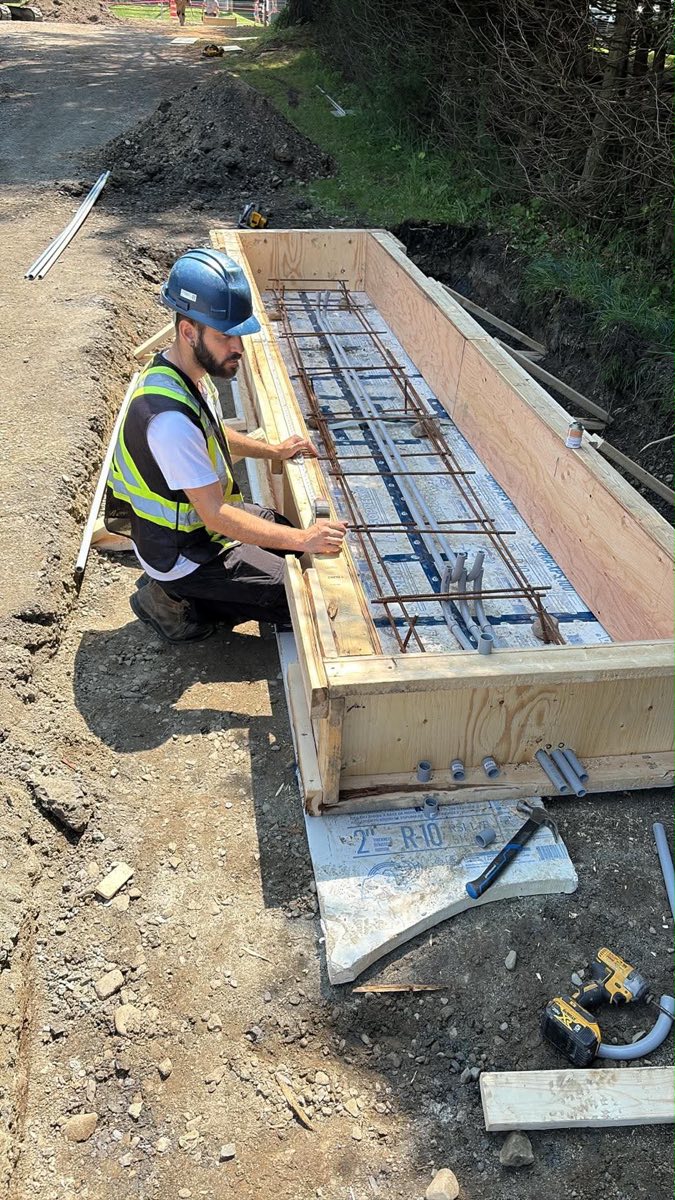
Lexoh field team preparing conduits and an equipment base on site
Real preparation for connected lane equipment.
Operating contexts

Access for appointments, deliveries, contractors and events

Business appointments

Day-limited access to the expected parking area.

Deliveries

A time window and lane matched to vehicle and destination.

Contractors

Access for the agreed work period, limited to the required zones.

Events

Arrival volume planned with identifiers distributed in advance.

Before specifications

Decide who manages each visitor access change

01

Who creates and changes the right?

Keep host, reception and security responsibilities simple.

02

Which information is necessary?

Collect what supports access without burdening the invitation.

03

What if the vehicle changes?

Provide a quick correction or assistance path.

04

How are after-hours arrivals handled?

Define who receives the call and what they can authorize.

Build the complete system

Related parking solutions

Explore the equipment and workflows connected to your installation.

02

Parking intercom

Give operators the lane context needed to assist and decide.

Parking intercom
03

Plate recognition

Use the vehicle plate for access, permits and temporary rights.

Plate recognition
04

Digital permits

Issue and validate rights by user, vehicle, zone and period.

Digital permits

Questions asked before a project

Clear answers about scope, operation and integration.

Not necessarily. A journey can use a preregistered plate or a code sent before arrival.

Yes. The right can apply only to the lanes, zones and times needed for the visit.

Authorized staff can correct it or assist the driver through the lane procedure.

They can be configured with a defined end time so they do not remain active.

Not necessarily. A QR code displayed on a sign may open a registration or payment form on the visitor’s phone. A QR access credential is presented to a compatible lane scanner and checked against the configured permissions. Specify which role each code serves, who approves the visit and how approval reaches the entrance. A submitted form or payment confirmation alone does not establish that the barrier has received a valid access permission.

A visitor access permission defines where and when the visitor may enter; it does not by itself assign a numbered space or establish that a space is available. If your site requires reservations, allocations or capacity limits, include those rules and any supporting software interface in the project scope. Define what the visitor should do when the permitted parking area is full.

A repeated visit still needs an owner, purpose and defined access period. If a contractor returns on scheduled dates, agree whether staff renew a temporary right or use an approved recurring category. A permanent employee or resident permit follows a different policy. Avoid leaving an occasional visitor on an unrestricted list simply because they have visited before.

Define an arrival point where an unexpected driver can wait and request help. The responsible host or authorized operator checks the destination and site policy before creating or approving a temporary right. After-hours coverage, vehicle changes and access to restricted areas should be settled in the procedure rather than improvised at a blocked lane.

The host or authorized administrator should cancel or expire the visit’s access through the supported process, then check the associated plate or code status. Confirm how the change reaches each relevant entrance controller, how staff verify it has taken effect and what procedure applies if a controller is disconnected. A changed central record alone does not prove that every entrance has received the cancellation. Decide who informs the visitor and the receiving team so outdated arrival instructions do not cause confusion. If the visitor already entered, follow the site’s departure and assistance procedure rather than assuming cancellation alone resolves the vehicle’s presence.

First decide whether the site needs to identify individual arrivals or only authorize a defined group. A shared code can make it harder to distinguish who used it or to cancel one person’s access. Prefer separately assigned rights when individual control is required, and confirm the supported credential options. Do not assume a code is single-use or resistant to forwarding unless that behaviour is included and tested.

Provide the correct site address, entrance, permitted arrival period, credential instructions and a reachable assistance contact. Explain where a driver should wait if the plate or code is not accepted, and how to report a vehicle change before travelling. Keep these instructions aligned with the actual lane configuration and host responsibilities; a general building address may not identify the visitor entrance.

Lexoh uses a hybrid cloud and offline architecture. Its mesh network lets devices communicate locally when the internet connection is unavailable. For visitor access, commissioning includes the configured access rules, expiry and the handling of changes during an interruption. Local device communication and remote cloud administration have different connectivity requirements; equipment still requires power.

Make arrival simple without losing control

Let us map the visitor types, responsibilities and exceptions at your site.

Full-size image

Call Lexoh 1-888-401-8019








