Skip to content

Lexoh kiosks

Access and payment kiosks, manufactured by Lexoh.

Lexoh manufactures kiosks in Québec for parking entrances and other controlled sites. Choose the access, payment, printing and assistance modules, then define how the kiosk connects to Lexoh software and the equipment at your entrance.

Lexoh LPK-128V2 kiosk

Configured for your site

What does an access or payment kiosk do?

An access or payment kiosk gives visitors a place to present a credential, follow instructions or complete the transaction configured for the site. Its selected readers, screen, payment terminal, printer and assistance equipment support that journey. The connected access system determines the permission to enter. Choose a kiosk model by the tasks, interfaces and installation conditions required, then confirm the included functions in its documented configuration.

From requirement to operation

A kiosk is one part of the site workflow.

  1. 01

    Define

    Identify the users, credentials, transactions and assistance path.

  2. 02

    Configure

    Select the screen, readers, payment and printing functions required.

  3. 03

    Deploy

    Install the kiosk with the connected lane or access equipment.

  4. 04

    Operate

    Review configured devices and events in Security Center when that connection is included.

Lexoh LPK-128V2 kiosk product view View full size

Product architecture

Reader, payment and assistance modules in one kiosk.

The LPK-128V2 can bring together the screen and the configured credential, transaction, printing and assistance components in one field enclosure.

  • Configured touch interface
  • Selected QR, 2D or card reader
  • Project-defined payment and printing
  • Intercom assistance when included
Explore the LPK-128V2
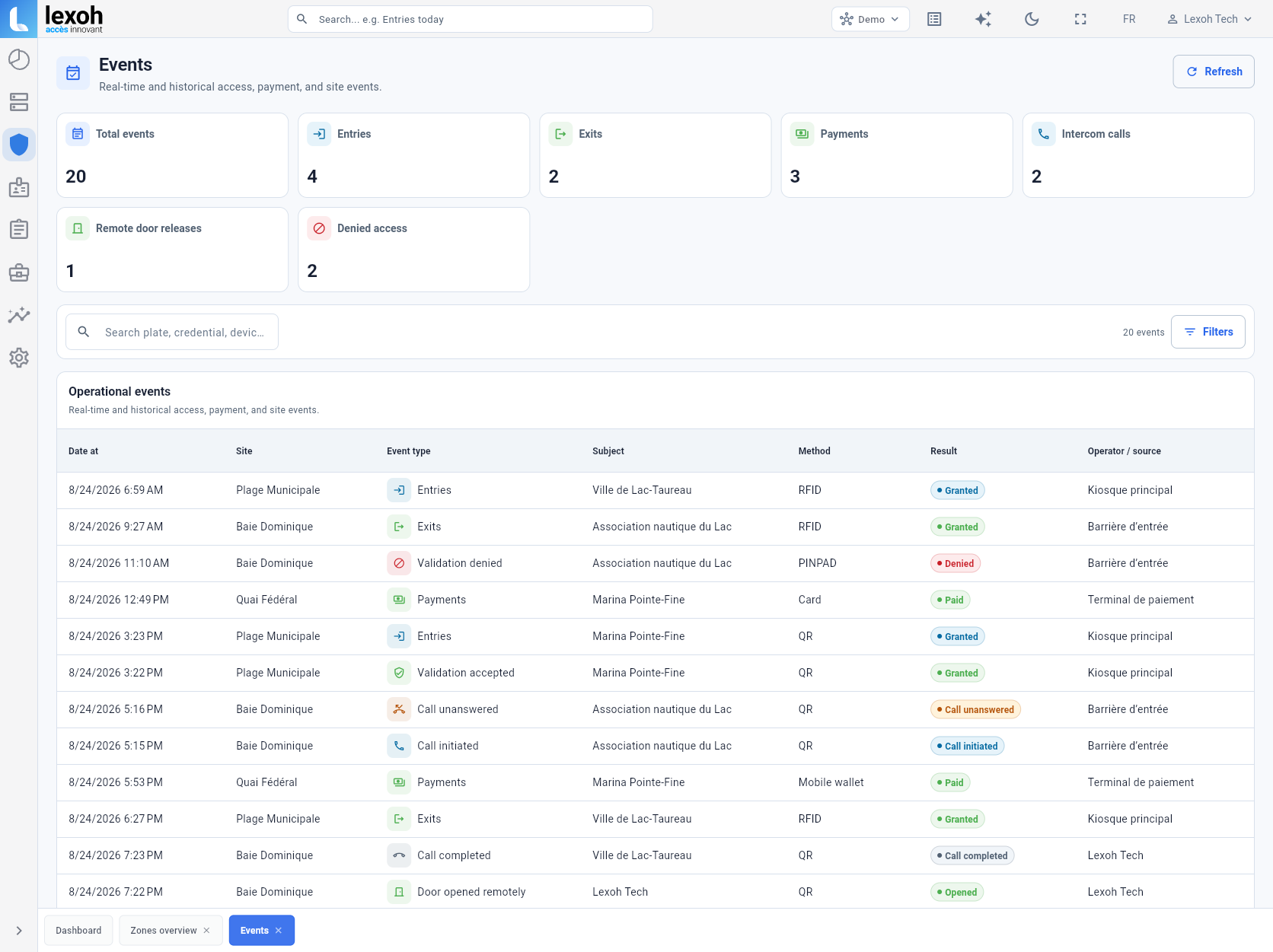
Lexoh Security Center operational events table View full size

Connected operations

Review kiosk events alongside site equipment.

When included in the deployed architecture, configured kiosk events can be reviewed in the same operational environment as connected equipment.

  • Configured operational events
  • Available result and source context
  • Review across configured sites
Explore Security Center
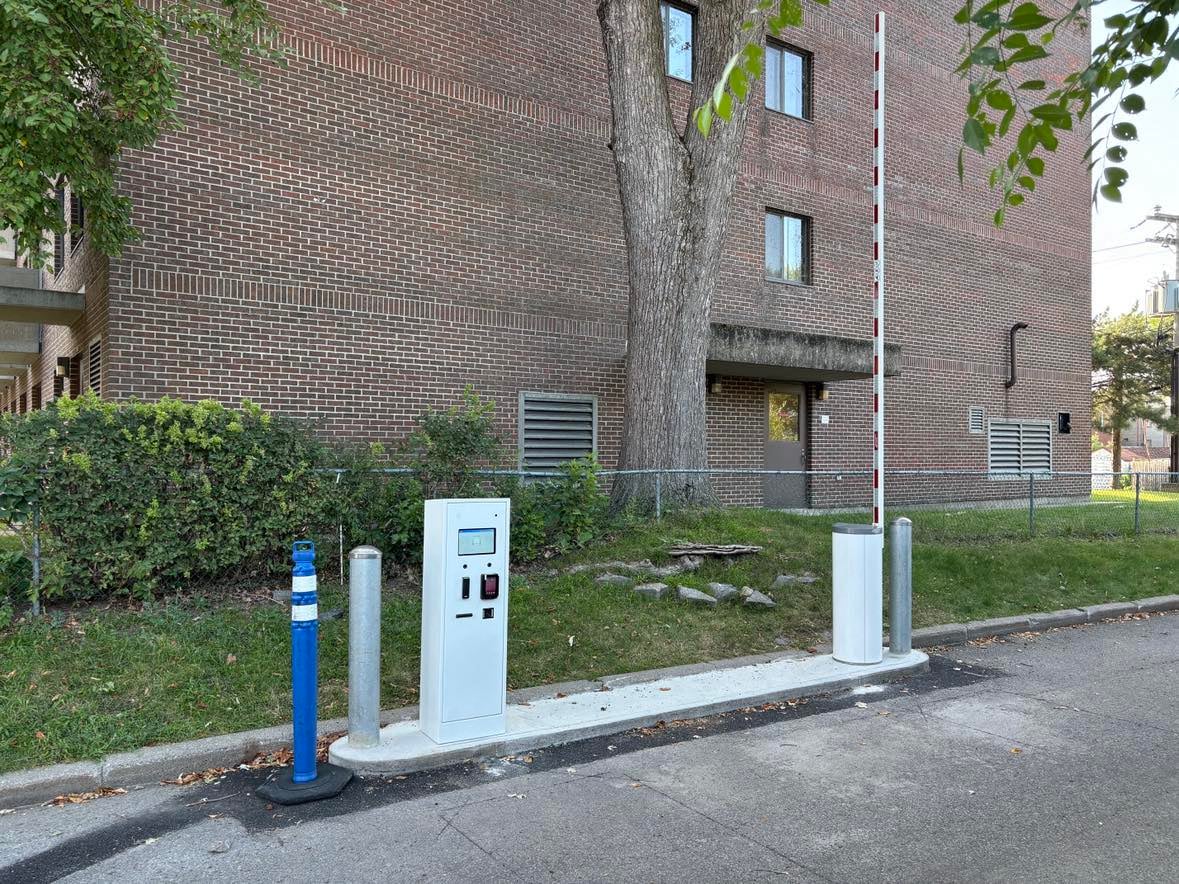
Lexoh kiosk and barrier installed at Collège Sainte-Anne
Collège Sainte-Anne: kiosk, barrier and protective bollards coordinated along the access lane.

Built for the field

Hardware that is installed as part of the complete lane.

The kiosk, barrier, protective elements and site work are coordinated around the real approach, curb and operating environment.

  • Site-specific positioning
  • Connected lane equipment
  • Commissioning in the operating environment
See the installation

Model selection

Compare LPK-128V2 and LCB-30 kiosks.

LPK-128V2 and LCB-30 support different access workflows. Each site configuration combines the selected model with compatible modules, services and lane interfaces.

Lexoh LPK-128V2 product view

LPK-128V2

Configurable payment and access kiosk for workflows with several user interactions.

Explore LPK-128V2

Swipe or scroll sideways to compare every column.

Comparison criterion LPK-128V2 LCB-30
Planning focus Payment and access workflow with several possible interaction modules. Compact access interaction positioned at the lane.
Functions considered Screen, QR or 2D scanning, credentials, payment and receipt or ticket handling. Credentials, payment and printing functions selected for the project.
Power supply 110–120 V AC 110–120 V AC
Operating temperature −40 to +70 °C −40 to +70 °C
Before ordering Confirm the touchscreen workflow, installed modules, service access and approved installation drawing. Confirm the stopping position, credential presentation, optional modules and approved installation drawing.

Use the linked model pages and datasheets for complete specifications. Confirm the included modules, enclosure protection, communication interfaces, anchoring and electrical connection in the project documents before ordering.

Kiosk product line

Choose the kiosk and its connected lane equipment.

Start with the kiosk, then connect the reader, assistance and lane equipment required by the project.
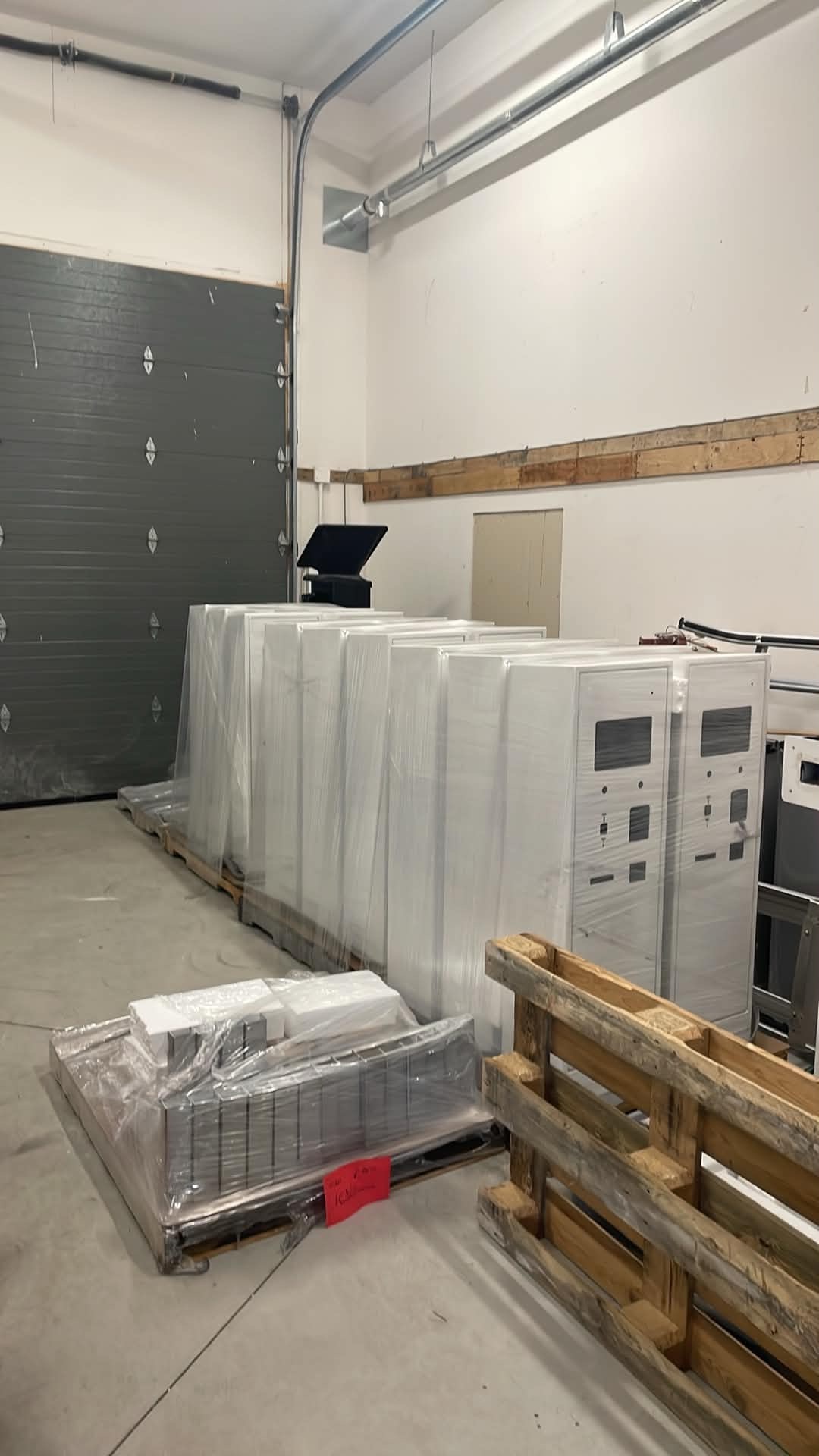
Lexoh kiosk enclosures prepared in production

Production and deployment

From production to the entrance.

Lexoh kiosk enclosures are prepared for deployment before they are installed with the access and lane equipment on site.

Browse technical resources

Kiosk questions

What to consider before selecting the enclosure and its modules.

The LCB-30 is 1330 mm high, 310 mm wide and 490 mm deep. It uses 110–120 V AC power and has an operating temperature range of −40 to +70 °C. A pin-hole camera is optional. Use the approved installation drawing to confirm mounting, cable entry and service clearances for the selected configuration.

Send a site plan or entrance photographs, the expected vehicle types, stopping position, access credentials and required payment, printing or assistance functions. Identify existing barriers and controllers, available power and network connections, and who will perform site work. Lexoh can then define the kiosk configuration and the equipment included in the proposal.

Define the required payment methods when planning the project. The proposal should name the payment terminal, provider, accepted methods and any account or connectivity requirements. Confirm receipts, unsuccessful payments and the assistance process during commissioning. A payment module is not included in every kiosk configuration.

Lexoh combines cloud management with offline operation through a mesh network that lets site devices communicate without internet. Local access depends on powered equipment and locally available permissions. The payment terminal, authorization service and remote assistance path have separate connectivity requirements. Include a known credential, a new visitor, a payment attempt and an assistance call in the acceptance tests for the selected kiosk configuration.

No. The kiosk model and installed components are selected around the access, payment, credential, printing and assistance functions required by the site.

When the selected architecture includes the Security Center connection, configured device and event information can be available in the same operational environment as other connected site equipment.

The kiosk is one component of the proposed system. Ask for an itemized scope covering the kiosk modules, payment terminal and provider, operating software, and any barrier, controller, reader or vehicle detector required for the lane. Identify installation and recurring services separately. Confirm the interfaces and test a complete arrival, payment and exit before accepting the installation.

Review the approach lane, stopping position, driver reach and the space needed to turn or queue before fixing the kiosk location. Check how the screen, reader and assistance control can be used from the expected vehicles, and coordinate the position with the barrier. Validate the proposed layout on site with representative vehicles during project planning.

Keep the selected model, installed components, service contacts and authorized access instructions in the site’s maintenance records. Identify any consumables, such as paper when a printer is installed, and provide a way to take the lane out of use during service. Follow the equipment’s maintenance instructions and assign electrical or technical work to the responsible qualified personnel.

Configure the complete lane

Start with the workflow. Then choose the kiosk.

Tell us what users need to do at the entrance and which equipment is already in place.

Installation photograph: Scotiabank parking entrance, Kingston.

Full-size image

Call Lexoh 1-888-401-8019