




















Ask for the installer, support contact, service hours, travel terms and parts arrangements for the site address in the written proposal. A regional product portfolio alone does not define local service coverage.
Meypar alternative
Meypar or Lexoh for your parking project?
Compare Meypar and Lexoh for parking access, payment and site management. Review ticketless operation, kiosks, software and integrations, then confirm the equipment and service available for your Canadian site.
Make the buying decision
Why choose Lexoh?
Choose Lexoh to combine its own kiosks with access, video and site operations in Security Center, backed by offline communication between devices.
Published by Lexoh. Linked sources support supplier statements; project requirements still need written confirmation.
| Capability | Meypar | Lexoh |
|---|---|---|
| Parking functions | Meypar publishes access, ticketless and payment systems.Source: Meypar — Access and ticketless systems | Security Center brings sites, devices, users, access events, video and transactions into one operating environment.Review parking access and revenue control |
| Remote operation and alarms | Meypar describes remote access-point control and mobile alarms for manual barrier openings, low ticket stock and terminal disconnection.Source: Meypar — Management systems | Security Center combines camera views, access events and device controls so operators can investigate an arrival and act from the same environment.Explore Security Center |
| Reports and data export | Meypar lists occupancy, revenue, discount and payment-method reports, with export for external analysis.Source: Meypar — Management systems | Security Center brings transactions and operational records together for reporting. The project defines the required fields and exchanges with external accounting tools. |
| Credentials and unread plates | Meypar lists printed/mobile QR reading, MIFARE and long-range TAG options, plus hybrid ticketless operation for unread plates.Source: Meypar — Access and ticketless systems | RFID, UHF, QR, PIN and license plate recognition support different user groups through the selected readers and cameras.Compare credentials and fallback options |
| Video and operating records | Meypar describes linking entry/exit camera images and plate-recognition images with operating records. Confirm the required interfaces and access rights.Source: Meypar — Integrable systems | Security Center combines camera views, access events and device controls so operators can investigate an arrival and act from the same environment. |
| Installation and service | Obtain the site-specific installer and service agreement. | Installation combines lane equipment, controller connections and software configuration. The project scope identifies site work, commissioning and support responsibilities.Review installation responsibilities |
| Ownership and lifecycle | Review the actual equipment and software agreement. | The project quotation sets out equipment, software and service charges, with ownership and replacement responsibilities attached to the selected offer.Compare project and recurring costs |
| Browser payment | Meypar describes EVO QRPay as browser payment without an app download or registration. A QR code opens payment; the entry ticket or plate identifies the stay.Source: Meypar — EVO QRPay (13 January 2026) | Lexoh connects payment kiosks and transaction records with site operations. Payment methods and receipt options depend on the selected terminal and payment provider.Review payment equipment and workflows |
| Offline device communication | The sources below do not establish an equivalent mesh network; this is not a claim that offline functions are absent. | Lexoh uses a hybrid architecture: cloud management plus an offline mode, with a mesh network that lets site devices communicate without internet. |
Published positioning is not a verified feature test of every configuration. A requirement marked for confirmation is unknown until reviewed; it is not an assertion that a supplier lacks it.
Pros and cons for your project
Compare the advantages that matter to your site. Lexoh brings its kiosks, access controls, video and offline device communication together in one ecosystem.
Lexoh
Advantages
- Hardware and software together: Lexoh manufactures its kiosks and develops Security Center, connecting physical equipment with day-to-day operations.
- Hybrid architecture: cloud management and an offline mesh network keep local device communication separate from the internet connection.
- One operating view: sites, devices, users, events and transactions are managed within Security Center.
- Choice of credentials: combine RFID, UHF, QR, PIN and license plate recognition with the readers and cameras selected for the site.
- Video alongside access: operators can review a camera view and the associated device controls in the same environment.
- A broader site platform: parking, doors, gates and connected site equipment form part of the Lexoh ecosystem.
Trade-offs and project considerations
- Replacing another system requires an equipment and data migration review; existing terminals and accounts are not automatically interchangeable.
- Offline device communication does not by itself establish offline bank-card authorization or remote cloud access; those services depend on their own connections and configuration.
Meypar
Advantages
- Access and ticketless equipment supports several credential types.
- Management tools include operating reports, remote controls and integrations with other systems.
Trade-offs and project considerations
- The regional offer determines the payment products, installation parties and support arrangements available for the site.
01
Confirm the regional product and delivery scope
Electromega’s parking catalogue lists Meypar access, payment and management systems. For your site, ask each quoted supplier to identify the exact models, payment configuration, installation parties and support contact. Confirm which responsibilities belong to the supplier, installer and manufacturer in the written proposal.
Source: Electromega — Meypar parking catalogue- Obtain current model and software references.
- Confirm the delivery, configuration and commissioning owners.
- Request the service and spare-parts arrangement in writing.
- If EVO QRPay is proposed, confirm Canadian availability, payment methods and the selected processor in writing.
02
Test what happens when ticketless access fails
If the project uses license plates or another ticketless credential, test a recognized user, a changed vehicle and a failed read. Then verify how the payment or permit result authorizes exit. The demonstration should cover driver assistance, corrections and the resulting operating record.
- Describe the credential and data source for each user group.
- Demonstrate an unread or unmatched credential.
- Verify the correction procedure and resulting record.
03
Review integrations and retained devices separately
A product’s ability to integrate does not establish compatibility with a particular installed barrier, payment service or business application. List each interface, owner and supported operation. For replacement, distinguish field-equipment reuse from data migration and validate both before committing to a cutover date.
- Name the external systems and versions.
- Define who tests the interface and maintains it.
- Ask both suppliers for the same evidence and demonstration results.
04
Example demonstration: an unread plate at a paid exit
Use an illustrative ticketless lot where a visitor has paid but the exit camera cannot match the plate. Give Meypar and Lexoh the same test conditions and agree how the driver requests help. The proposal should identify the fallback equipment and the operator’s authority.
- Retrieve the correct visit without creating a second charge.
- Show how the authorized operator resolves the mismatch and permits the agreed exit.
- Review the original payment, correction and exit event, then repeat the case with assistance unavailable.
Connect the equipment and the operating software
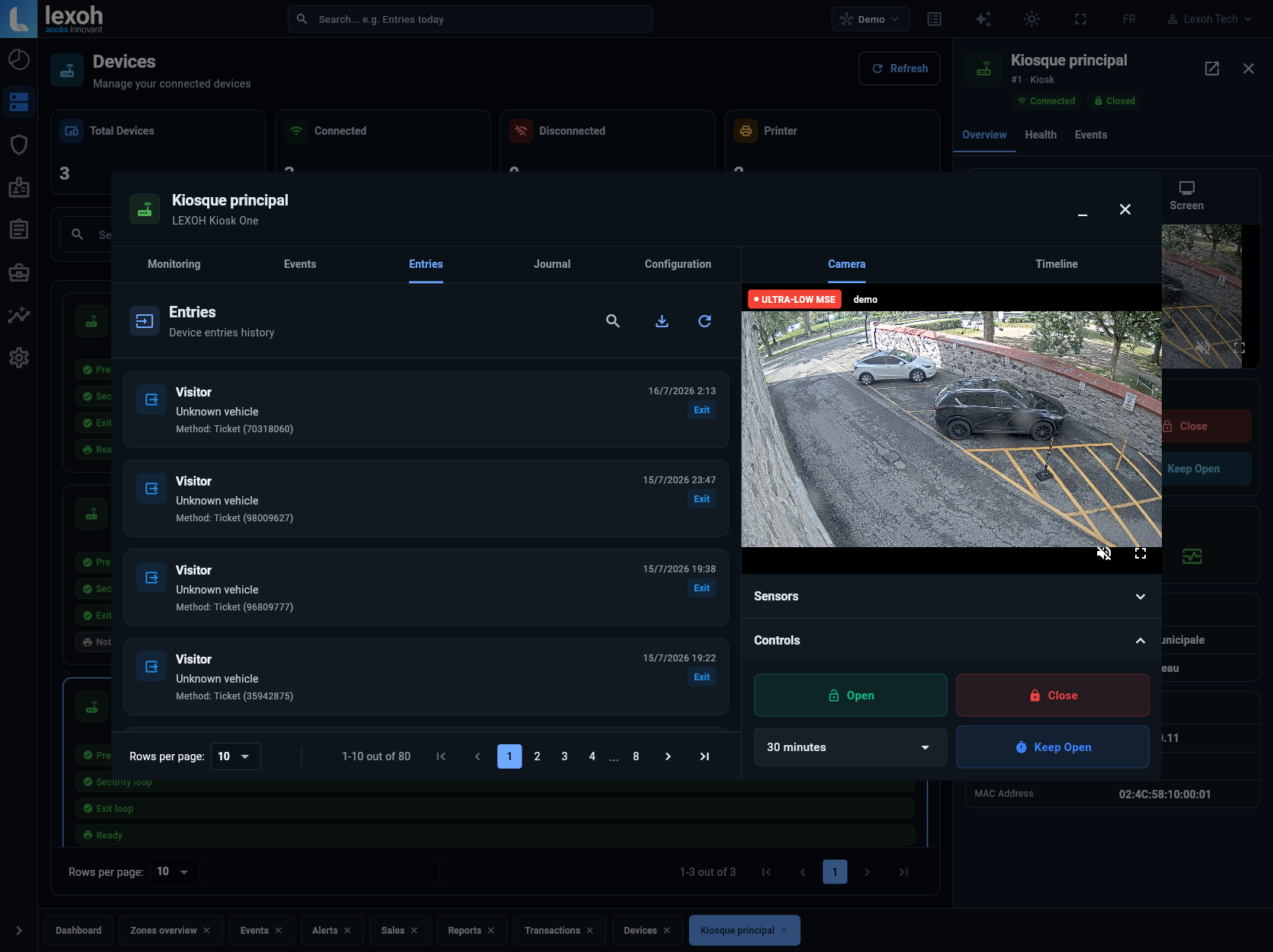
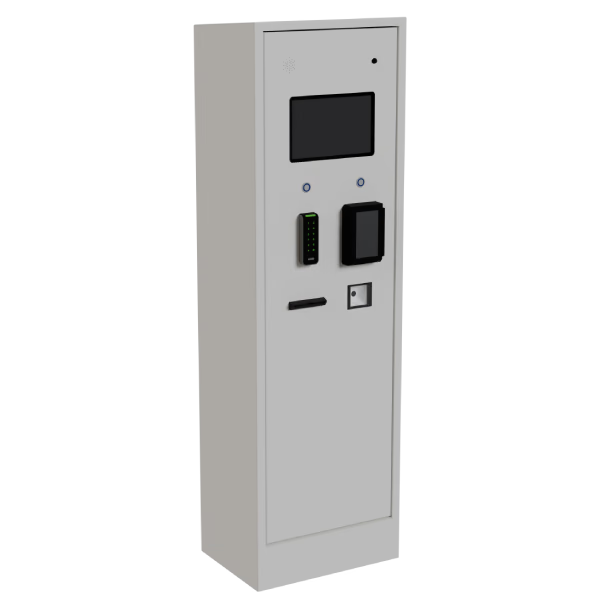
Lexoh combines its parking kiosks with Security Center. The software view above shows a site device, its camera view and operating controls; the LPK-128V2 kiosk below provides the physical access and payment interface. Select the readers, payment modules and field connections for your project.
Meypar alternative questions
Have Lexoh review the exact models, their condition and supported interfaces before planning reuse. Confirm equipment compatibility and account migration separately for your installation.
Request equivalent equipment, site work, software, interfaces, payment charges, migration, training and service over the same period. Separate options and exclusions before comparing totals.
Ticketless describes the credential or visit record, while a barrier controls the physical lane. Ask whether the proposed ticketless journey uses a barrier, how a failed read is handled and who deals with unpaid stays. Compare the complete operating model.
No. Meypar describes EVO QRPay as payment through a mobile browser: a QR code opens the payment page, and the driver identifies the stay with an entry ticket or license plate. It supports both ticketed and ticketless visits. Confirm how the proposed access system links that payment to the visit and authorizes exit. Canadian availability and payment arrangements still need confirmation for your site.
Lexoh uses a hybrid architecture: cloud management plus an offline mode, with a mesh network that lets site devices communicate without internet. This provides local communication between devices during an internet interruption. Payment authorization and remote services have separate connectivity requirements.
Sources and comparison method
Sources reviewed October 1, 2026. Supplier claims are summarized from the official pages below. This comparison is published by Lexoh. Confirm current equipment, prices, compatibility and service terms in each supplier’s written proposal. Brand names identify the compared systems; no affiliation is implied. Access and management details reviewed October 2, 2026.
See how Lexoh fits your site
Show us your entrances, user groups and existing equipment. We will review a Lexoh configuration combining kiosks, access, video and offline device communication for your project.