




















Share the product, version, required workflow and available interface with the project team. Confirm whether a supported connector exists or whether the project needs a custom integration before planning delivery.
For software integrators
Software integration for parking and access control
Plan how your booking, customer or property-management software will connect to Lexoh access control. For software integrators, the project starts with the business rule: who may enter, which entrance they may use and when their access changes. Confirm the supported interface and delivery responsibilities with Lexoh before committing to a connector.
Make the buying decision
What should an access-control software integration deliver?
An integration should turn an approved source record into the intended access permission and give operators a way to verify the result. Define the source system, the change to send, the entrance affected and the team responsible for a failure. Review the installed Lexoh version and the external software together to confirm whether an existing connector or custom development can meet that scope.
| Deliverable | Scope to define | Evidence to obtain |
|---|---|---|
| Business workflow | Source software, version, trigger and intended access change | Agree a representative scenario and confirm connector or custom-development scope. |
| Identity and permissions | Integration account and permitted operations | Verify session handling and least necessary access. |
| Source records and identifiers | Source record, external identifier and effective dates | Test create, change, cancellation and duplicate messages. |
| Failure handling | Rejected, delayed or unavailable operations | Define retry limits, reconciliation and the manual process. |
| Acceptance | Expected access and operating record | Demonstrate the end-to-end journey on the agreed version. |
| Handover and support | Developer, configuration team, site operator and maintenance owner | Agree escalation contacts, version-change review and the operating runbook. |
01
Follow the booking from confirmation to departure
Use this planning example to define the required behavior; it is not a claim that a particular booking connector is available. A confirmed reservation establishes the proposed access period, a date change updates it and a cancellation removes the intended permission. Decide which system owns those decisions and how the operator confirms that each change reached the site.
- Include changed dates, replacement vehicles and removed access in the scope.
- Use a stable record identifier and agree the time zone and effective dates.
- Specify how staff resolve a duplicate change or a mismatch between systems.
02
Confirm the interface and delivery scope
Review the external product, its version and the required operations with Lexoh. The published application programming interface (API) reference is a technical starting point. Confirm authentication, permissions, supported fields and the method for retrieving events for the installed version. Identify any custom development, licensing, test access and support work in the proposal.
- Name the external-system developer, Lexoh configuration contact and customer approver.
- Confirm the required record changes and event-delivery method before implementation.
- Limit shared personal information and protect the integration credentials.
03
Prove the business result and the recovery path
Test a valid record, a rejected update, an expired session and an interruption. Lexoh’s hybrid architecture allows local devices to communicate through an offline mesh network; an external software exchange has separate connectivity requirements. Verify the intended access right and reconcile the operating record after each test. Assign support ownership to the external-system developer, Lexoh configuration team and property operator.
- After a lost confirmation, compare the source record, access permission and operating event before retrying. Record how the integration avoids applying the same change twice.
- Test a cancellation followed by a delayed older update. Confirm that the older message does not restore the revoked permission.
- Test changed dates and time zones at the entrance, including a request outside the permitted period.
- Name the person who reconciles unresolved records and deliver a runbook for failures and version changes.
Connect the equipment and the operating software
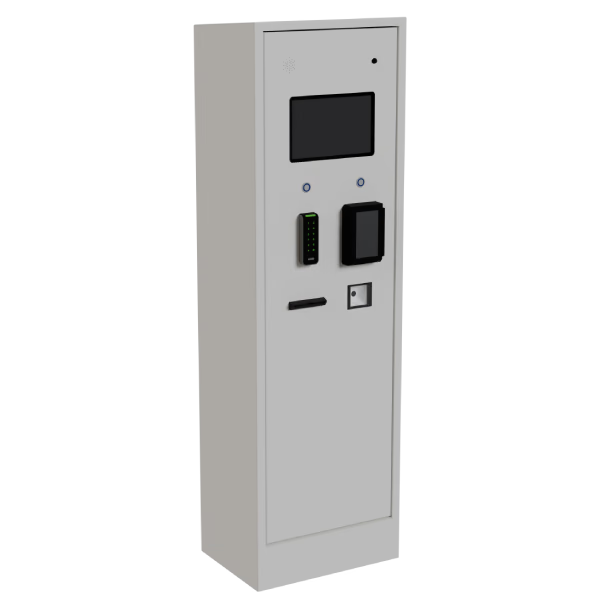
The LPK-128V2 kiosk shown here is one physical equipment option. A software permission must correspond to the credential, entrance and device configuration selected for the project. Coordinate the integration with the field installer, then check the expected passage and operating record in Security Center. The software demonstration does not establish compatibility with a specific external application.
Integrator project questions
Only after confirming a supported subscription and delivery contract for the installed version. The published event operations alone do not establish webhook registration, retries or delivery guarantees.
The integration defines an authorized business request. It does not replace the approved equipment control and protective design. Validate software and field behavior as distinct parts of the complete system.
Send the external software name and version, available interface documentation, sites and entrances involved, required record changes and target dates. Include the current equipment and the teams responsible for development and installation. Lexoh can review the scope with you; cost and delivery depend on the confirmed connector, configuration and development work.
Review the installed barrier, reader, controller and accepted credential alongside the software interface. Existing equipment may be retained only where its condition, interfaces and tested behavior meet the project requirements. Assign the physical compatibility check to the installer and validate the complete result during site acceptance.
Yes. Lexoh combines cloud management with an offline mode that uses a mesh network for local device communication. Include this behavior in the site’s commissioning plan alongside the equipment’s power requirements. Remote access, external software exchanges and payment authorization depend on their respective connections.
Scope your software integration with Lexoh
Share the software and version, the access change you need, the entrances involved and your delivery team. We will review the interface, field dependencies and project responsibilities with you.