
Start with the system overview
The dashboard brings together activity, alerts and summary figures for the selected Lexoh system. Use it to identify what needs attention, then consult the relevant event, device or transaction record. A summary alone does not establish why an entry was refused or whether a payment settled.
The reference view below shows Visitors, Average Time, Events, Alerts, Total Revenue and Capacity, together with a map and recent activity. This guide explains how to read those elements; it does not promise the same layout in every installation.
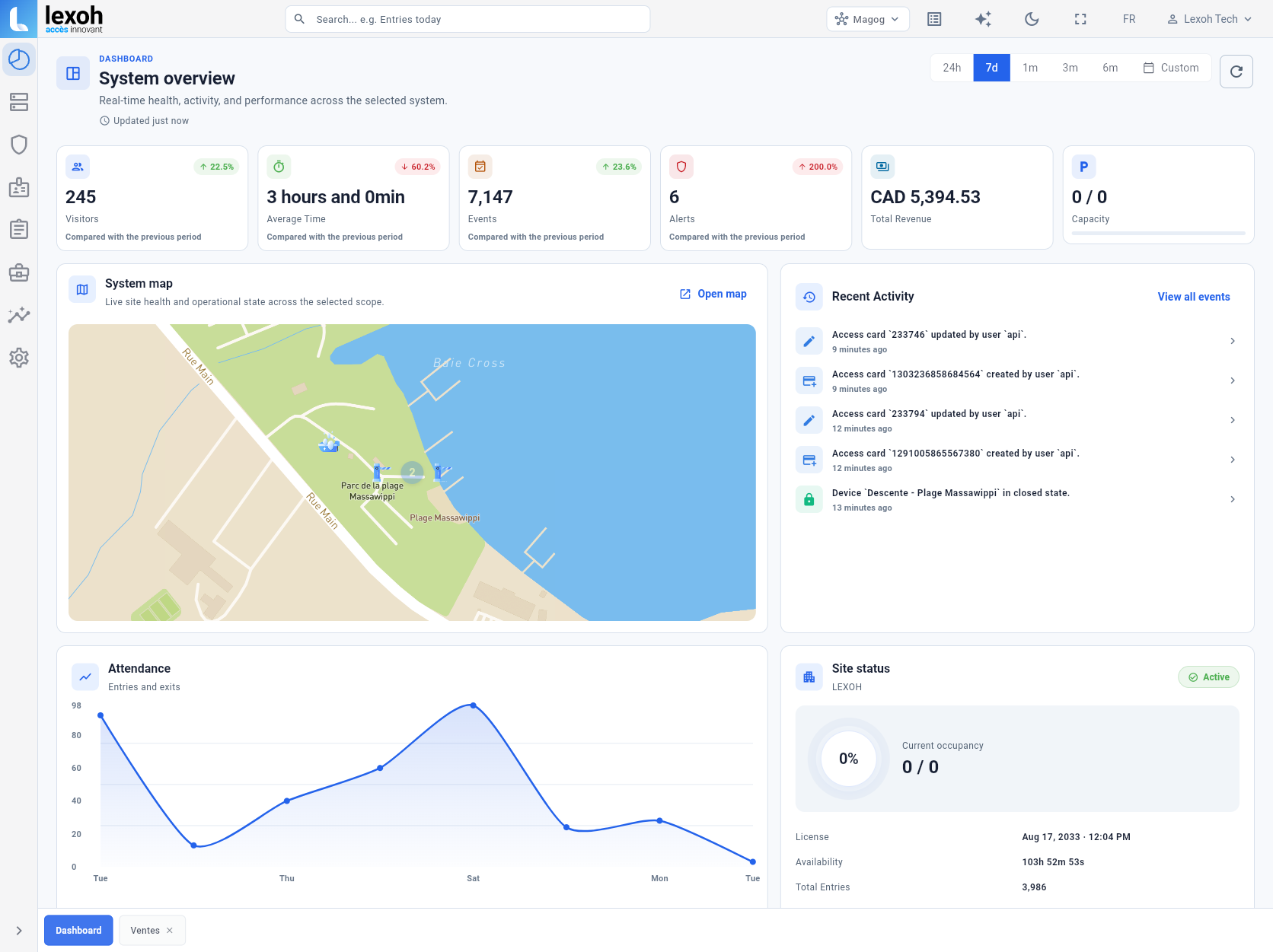
Open the correct system
- Sign in through the address supplied for your organization. Use your own authorized account.
- Check the selected system name before interpreting its dashboard. The system selector is shown near the top of the reference view.
- Confirm that your account has access to the site and records needed for your task. Ask your administrator about a missing system or permission.
- When reporting a problem, note the system name and software version if available. Do not include passwords or access tokens.
Understand the summary figures
Read the label, unit, selected period and comparison basis together. These checks help prevent different measures from being treated as interchangeable.
Visitors
Confirm what the installed report counts. Do not assume that visits, entry events and unique people are the same measure.
Average Time
Check which visits have a usable start and end time and whether open or incomplete visits are excluded. An average does not describe every visit.
Events and Alerts
An event count describes recorded activity; it is not a vehicle count. An alert total does not by itself establish how many incidents remain unresolved.
Total Revenue
Check currency, period and included transaction states. Review refunds, cancellations, taxes and settlement separately in the applicable records.
Capacity
Confirm the configured capacity and how the occupancy count is maintained. A missing or zero capacity setting is not proof that every space is available.
Trend percentages
Check the comparison period. A higher alert count may require investigation; a green arrow or positive percentage is not automatically a good operating result.
Set the scope and period
The reference view has 24h, 7d, 1m, 3m, 6m and Custom period controls. Check the actual start and end dates, time zone and system scope in your version before comparing two views. Do not assume a calendar month and the last 30 days are interchangeable.
Use the same scope when comparing a summary with detailed records. Record any additional filters or excluded transaction states. If your installation offers layout customization, use its version-specific instructions; this guide does not assume drag-and-drop editing or shared presets.
Check whether the data is current
The reference view shows an update label and a refresh control. Check the reported update time and whether new records are arriving from the affected equipment. Refreshing the page cannot recover an event that the source has not delivered.
If a figure appears stale, note the last visible record time, selected period and connection symptoms. Use the available refresh control, then compare against the underlying records. There is no universal refresh interval stated here.
After a connection loss, treat the figures as potentially outdated until data flow is verified. Do not infer current gate position, occupancy or transaction completion from an old dashboard value.
Reconcile a figure before acting
For a mismatch, first align the system, period, time zone and record status. Then inspect individual events around the discrepancy. Check for missing exit records, duplicate events or a changed counting baseline before changing configuration.
Illustrative count check: a starting occupancy of 20, followed by 15 accepted entries and 8 accepted exits, would produce 27 if every passage is counted once and the scope is unchanged. This example is a reconciliation exercise, not a measured Lexoh result or a guarantee of a particular counting method.
Use the appropriate transaction records for revenue questions. Visitor duration alone does not measure customer satisfaction, and dashboard trends alone do not establish profit, future demand or equipment condition.
Investigate missing or unexpected data
For support, provide the system, selected period, affected metric, expected result and one relevant timestamp or record reference. Share screenshots through the agreed support channel, with unrelated personal or credential data removed.
Empty panel
Check system selection, date range and account permissions before treating an empty panel as zero activity.
Different totals
Compare the same record type, time boundaries and status filters. Preserve examples of the records that explain the difference.
Old values
Compare the update indicator with the latest source events. Report the affected device, last known update and connection symptoms.
Display problem
Record the browser, screen size and visible error. If a reload is appropriate, save your investigation notes first. Avoid resetting shared settings without understanding the effect.
Use a repeatable daily review
When the installed version changes, recheck the labels, available panels and metric definitions with the system administrator. Keep the team’s procedure aligned with the software actually in use.
- Confirm the selected site and the freshness of its data.
- Review relevant alerts and recent activity; assign exceptions to a responsible person.
- Compare operational counts against the relevant records before making a configuration change.
- Record the issue, action and follow-up result for the next shift. Keep records according to the organization’s retention and access rules.