




















Define the visit before issuing a pass
Lexoh guest access uses credentials for a visitor’s intended entrance and visit period. The guest workflow can avoid creating a full customer profile where supported by the installation. Confirm the available credential types, required associations and operator permissions for your site.
A guest credential is not proof of the holder’s identity. Record the responsible host or service contact through the site’s process, and identify the visitor, purpose, permitted entrance and start/end times. The guest label does not by itself make a credential temporary or restrict where it works.
For contractors, deliveries and short visits, define the required access before choosing a format. Include the exit and help arrangements so the visitor knows what to do if the pass is refused or the visit runs late.
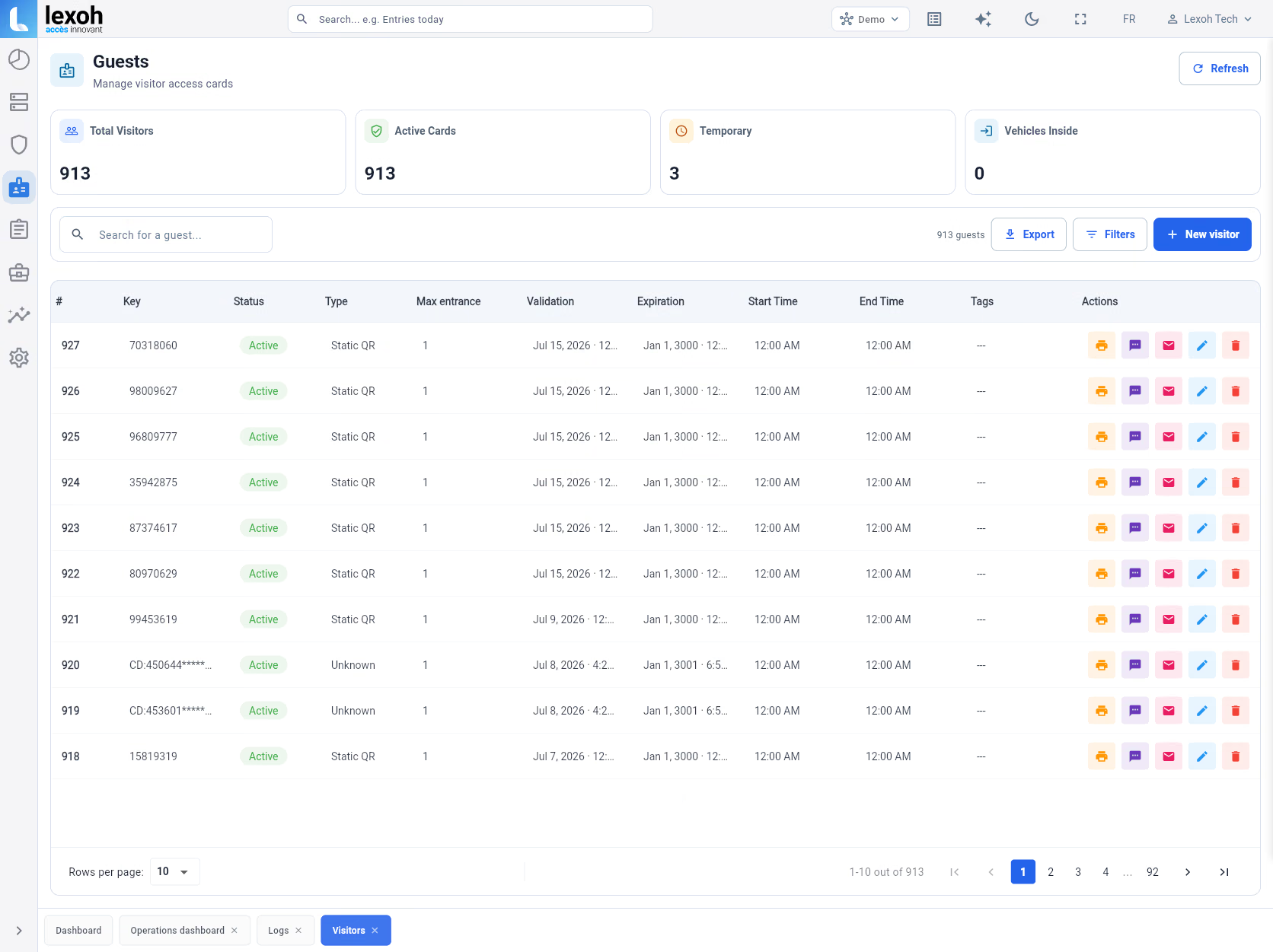 Enlarge the guest-access reference view
Match the credential to the reader
Choose a format offered by the current guest workflow and supported by the installed reader. A format’s name alone does not establish offline validation, resistance to copying or permission to enter.
| Format | What to verify |
|---|---|
| Static QR code | A fixed code can be presented on a suitable screen or printout. Check readability and server/controller validation; a printed code does not establish that access works offline. |
| Dynamic QR code | Check how the current code is obtained and refreshed, its validity window and clock requirements. A saved screenshot may be stale. Do not assume a rotating code is a single-use pass. |
| Radio-frequency identification (RFID) | Check the card or fob technology, reader compatibility and encoded identifier. Verify the actual credential is authorized for guest use; a brand name alone is insufficient. |
| License plate recognition (LPR) | Check the vehicle’s plate, recognition equipment and authorization rule. Recognizing a plate is distinct from approving access, and a fallback process may be needed. |
Create a credential for the intended visit
- Confirm the visit details and your authority to issue access. Search existing guest records to avoid accidentally issuing multiple valid credentials for the same visit.
- Choose the supported credential type and record the guest reference or label. Complete the required fields and associations shown by your version.
- Set an explicit start and end, including the site’s time zone. Use the actual visit period rather than automatically granting access until the following day.
- Configure the permitted entrance or device rules and any applicable schedule. Verify the role of zone associations in your installation instead of assuming that a zone name grants access.
- If a single-use or maximum-entry setting is offered, confirm what consumes a use, what resets a counter and how exit or re-entry is handled.
- Save and reopen the credential to compare the values. Verify the setup with an approved test credential using equivalent rules. Testing the visitor’s single-use pass may consume its only use; check the remaining allowance before distribution.
Check time, location and usage together
Credential status, validity dates, schedules, device permissions and usage limits answer different questions. Review their combined result at the intended reader. Zone membership does not prove automatic inheritance of schedules or a priority rule.
For a visit from 09:00 to 12:00, confirm the intended time zone, allowed entrance and exact boundary behavior. Check an allowed time inside the window, a time before the start, a time after the end and an unapproved entrance. Do not infer whether exactly 12:00 is accepted from a date label alone.
A single-use setting may refer to a validation, an entry or another counted action. Establish its meaning before testing repeated scans or planning exit and re-entry. A limit of one is not automatically one vehicle currently on site.
Expiry, cancellation and replacement
Expiry is the configured end of validity; cancellation is an action to withdraw access. If the visit changes or a pass is lost or sent to the wrong person, apply the approved revocation process and verify the result. Issuing a replacement does not by itself invalidate the original.
Disconnected devices
Confirm which rules and credentials the controller retains when disconnected, and how updated settings reach it. A deactivation saved centrally is not proof that every disconnected reader has received the change. Use the site’s approved fallback procedure until the intended result is verified.
Deliver the pass with usable instructions
Use the delivery methods enabled for your installation, such as a message, email, printed pass or supported wallet pass. Verify the destination and include the entrance, visit window and time zone, presentation method and help contact. Avoid including an active code in broadly shared support notes.
A sent message does not prove delivery to the intended person. Confirm receipt when the visit requires it, and explain whether forwarding or sharing is permitted. SMS and email do not guarantee that only the intended visitor can use a transferable code.
For printed passes, check the complete code, contrast, size and reader performance using the intended media. A changing QR code needs its supported presentation method; a paper copy may not remain current.
Wallet presentation
If a Google Wallet option is enabled, confirm the presentation method at your reader. Saving a pass to a wallet does not by itself prove that it supports tap access. Verify whether the visitor must show a code or use an explicitly supported near-field communication (NFC) integration. Confirm device requirements before promising an app-free or offline experience.
Review usage and close out the visit
Guest activity can support an operational review. A report alone does not prove complete coverage of all visits or compliance with a particular requirement.
- Locate the credential by stable reference. Record the site, period, time zone and active filters before reviewing events.
- Distinguish a credential presentation, validation result, device command and confirmed passage. Several events can relate to one attempt, and missing events can have several causes.
- Compare recorded entry and exit activity with the visit question. A “currently inside” result is recorded system state, not a verified physical headcount or identity check.
- If exporting is available, verify the actual format, fields, row count and whether the scope includes selected, visible or all matching records. Keep the original file and filters with the review.
- At the end of the visit, verify the intended expiry or revocation outcome. Retain or remove records according to the site’s process; deleting an expired record is not the same task as stopping access.
Separate delivery, reading and validation failures
The guest did not receive the pass
Verify the destination and available delivery status. For email, check junk folders; for messaging, check the supported number format and service status. Confirm whether resending keeps the same credential or creates another, then account for any earlier valid copy.
The reader does not detect the credential
Use an approved test at the intended reader. Check screen or print quality for QR, compatibility for RFID, or the plate and camera view for LPR. Confirm reader connectivity without assuming that a failed read is a permission refusal.
The credential is read but access is refused
Check the exact validation result, status, start/end times, schedule, device permissions and usage allowance. For changing codes, verify freshness and the supported time setup. Do not extend permissions broadly just to make a test pass.
Validation succeeds but the barrier does not open
Check the command, device feedback and approved physical observation. Acceptance of a credential does not prove that the barrier moved. Follow the equipment fault procedure and provide the event reference to support.
A cancelled or expired pass still appears usable
Check the exact credential reference, time zone and rule boundaries, then confirm controller synchronization and the recorded validation outcome. Use the site’s response procedure and record the affected entrance, time and last verified state.